
Macy’s Gift Card Error and Solutions
Macy's gift cards are a great way to shop for clothing, home goods, beauty products, and more. However, sometimes users may encounter errors when trying to redeem or use their Macy’s gift cards. From invalid codes to balance display issues, these problems are common but often easy to resolve.
In this guide, we’ll discuss the common error messages you may face when redeeming your Macy’s gift card and provide simple solutions to help you get back to shopping.
Common Macy’s Gift Card Errors
Here are the most frequent Macy’s gift card errors users encounter, along with their likely causes and solutions:
| Error | Likely Cause | Solution |
|---|---|---|
| Invalid Card Number | Incorrect card number entered or card not activated | Double-check your card number and re-enter it carefully. Ensure the card is activated. |
| Card Already Redeemed | The card has already been used or fraudulently redeemed | Report to Macy’s fraud department and provide purchase proof. |
| Balance Not Updating | Balance doesn’t update after a transaction or technical error | Wait a few minutes and check the balance again via Macy’s website or contact customer service. |
| Region Not Supported | Gift card not valid for your country or region | Ensure your Macy’s account is registered in the correct region or try using the card in a supported region. |
| Card Expired | The gift card has passed its expiration date | Check the card expiration date. If expired, contact Macy’s customer service for assistance. |
How to Fix Common Macy’s Gift Card Errors
1. Invalid Card Number Error
If you receive an “Invalid Card Number” message, it means that the card number you entered is either incorrect or the card has not been activated properly.
Solution:
- Double-check the card number: Ensure there are no typos or missing digits.
- Activate the card: If the card was not activated at the time of purchase, visit the Macy’s website and log into your account to activate it online.
Macy’s Gift Card Activation Page
2. Card Already Redeemed Error
If the card is already marked as redeemed, it likely means that someone else has used your card, or it was fraudulently redeemed.
Solution:
- Report fraud: Immediately report the issue to Macy’s customer service and provide your purchase receipt and other relevant details.
- Proof of purchase: You may be asked to provide proof of purchase to verify that you are the legitimate owner of the card.
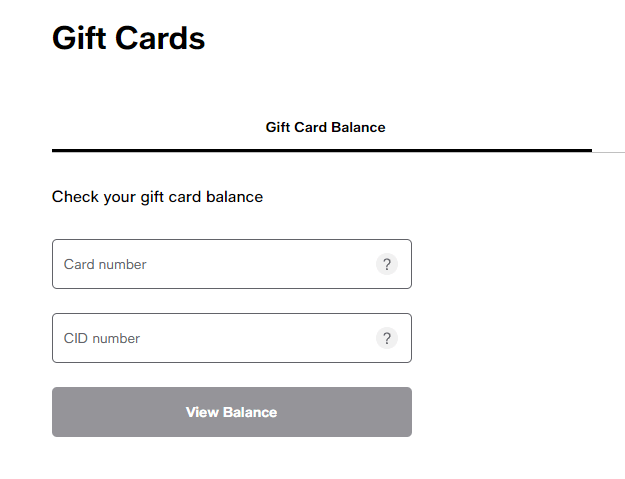
3. Balance Not Updating Error
<pSometimes, users experience issues with the card’s balance not reflecting after making a purchase.
Solution:
- Wait for updates: Sometimes it takes a few minutes for the system to update the balance after a transaction.
- Check balance manually: Visit the Macy’s website and log in to your account to check the current balance.
- Customer service: If the balance still doesn’t update, contact Macy’s customer service for assistance.
4. Region Not Supported Error
Macy’s gift cards are typically region-specific, and they may not work if used in an unsupported country or region.
Solution:
- Check your region: Ensure that your Macy’s account is set to the correct region that supports the card.
- Switch to supported region: If you are outside of the supported region, consider creating a new account with the appropriate region.
5. Card Expired Error
If your Macy’s gift card has expired, it will not be redeemable.
Solution:
- Check expiration date: If the card is expired, unfortunately, you won’t be able to use it.
- Request a replacement: Contact Macy’s customer service to inquire if they can issue a replacement or credit for expired cards.
Common Questions About Macy’s Gift Cards
1. Why can’t I redeem my Macy’s gift card?
If you cannot redeem your Macy’s gift card, ensure it’s been activated and that you’ve entered the correct information. If the issue persists, contact Macy’s customer service for help.
2. Why is my Macy’s gift card not working?
If your card isn’t working, it might be due to balance issues, incorrect information, or system errors. Double-check the card details and balance, and contact Macy’s customer support for further assistance.
3. How can I check the balance on my Macy’s gift card?
You can check the balance online via Macy’s website or by calling customer service. Simply visit Macy’s Gift Card Balance Check and enter your card details.
4. Why is my Macy’s gift card showing as invalid?
The "Invalid Card" message typically occurs due to a typing mistake or if the card has not been activated properly. If the card is activated and you’re sure the code is correct, contact Macy’s customer service for clarification.
5. Can I use my Macy’s gift card at Macy’s stores and online?
Yes, Macy’s gift cards can be used both in-store and online. However, ensure the card is activated, has sufficient balance, and is being used in the correct region.
6. Can I sell my Macy’s gift card for cash?
Yes, you can sell your Macy’s gift card on trusted online platforms that allow you to exchange gift cards for cash.
Official Macy’s Links for More Information
No Older Posts
No Newer Posts